From evidence to policy in minutes
What is the STRIDE Toolbox?
The core purpose
The STRIDE Toolbox is an evidence-to-policy platform designed to bridge European educational research and daily political governance. Instead of reinventing the wheel, this platform lets you analyse what peer systems across Europe have already tested, what worked, and what failed.
Whom is it for?
- For Policymakers: Use the toolbox to find proven interventions, anticipate implementation bottlenecks, and access concrete policy recommendations for your upcoming legislation.
- For Knowledge Brokers & Analysts: Use it to locate, navigate, and translate complex research data into actionable cabinet briefings and impact assessments.
What is inside the database?
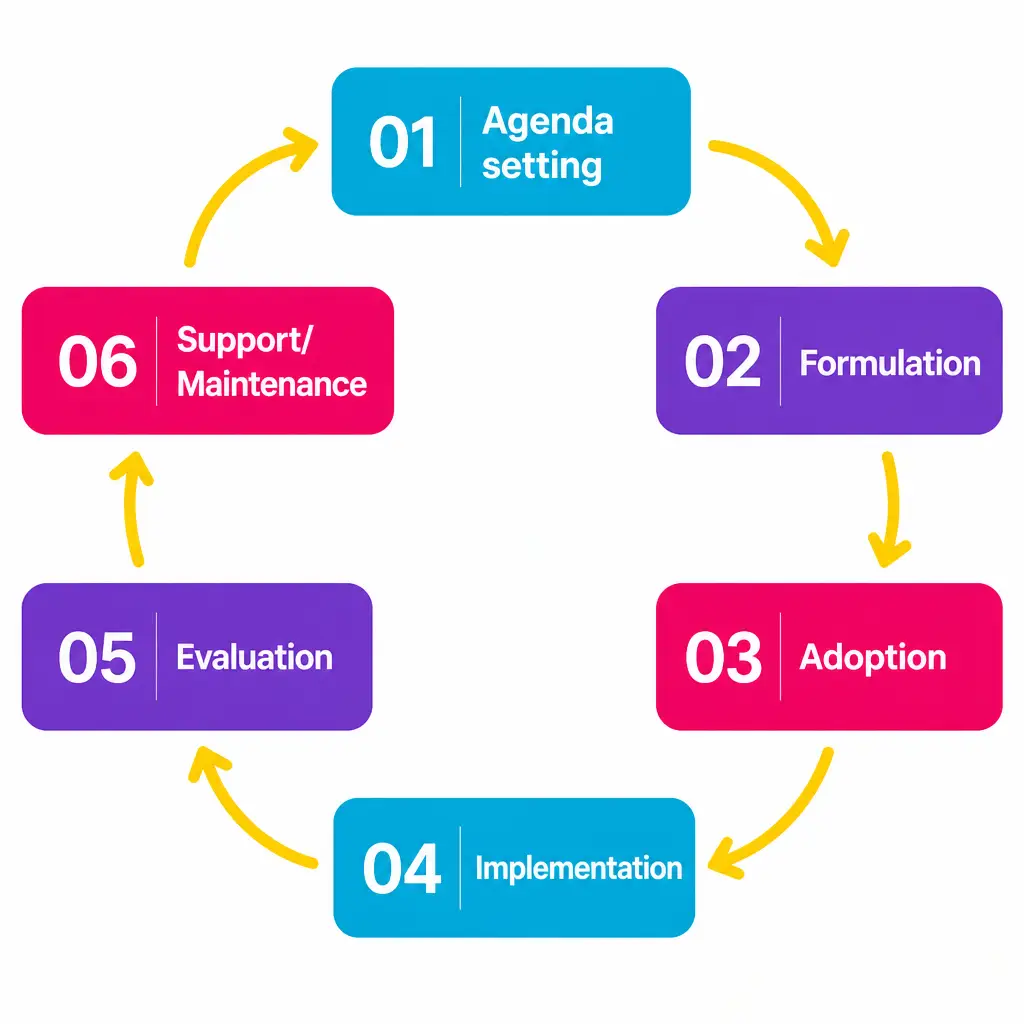
The database covers educational reforms from early childhood education (ECEC) to secondary and adult learning across Europe. All data is categorized around the 6 stages of the Policy Cycle:
Agenda Setting → Formulation → Adoption → Implementation → Evaluation → Support
Navigate the Toolbox
The STRIDE Toolbox is designed to support both quick reference searches and in-depth exploratory research.
- The STRIDE Toolbox offers multiple interconnected pathways so you can explore policy content according to your needs:
- Main menu: Your permanent navigation bar. Use this to jump directly between core sections like the Policy Cycle, Policy Reform Explorer, Library, and others
- Contextual Shortcuts: Found on the homepage and within sidebar areas. These dynamic widgets act as quick-launch buttons directly into specific features — such as launching the AI Assistant or jumping straight to a featured case study.
- Linking inside individual reform pages, inline links and related tags allow you to jump horizontally between similar policy measures in other European countries without having to return to the main menu.
- AI Assistant (Conversational Navigation): If you are unsure where a specific topic lives, simply ask the AI Assistant (e.g., “Where can I find reforms about early school leaving in Austria?”), and it will synthesize the answer while pointing you directly to the relevant page.
Which tool should I use?
| If you want to… | Use this tool… | What you will find… |
| Solve a specific policy problem or ask a direct question | The AI Assistant/Search | Instant, tailored answers, tables, or summaries based directly on the platform’s comprehensive research data. |
| Understand a specific country’s reform in-depth | Case Studies | Deep-dive insights into how Denmark, Norway, England, Hungary, and Poland tackled educational inequalities. |
| Compare policy approaches across borders | Comparative Research | Documented evidence and structural recommendations mapped across different national and local levels. |
| Visualize educational and socio-economic trends | The Interactive Map | A visual overview of regional factors, policies, and achievement gaps across 29 European countries. |
A key tool in the toolbox: The AI Assistant
All the research documents, national cases, and econometric models on this platform serve as data-feed for the STRIDE AI Assistant. You do not have to read the reports yourself—the AI will do it for you.
3 golden rules for better AI results
To get sharp, structured inputs for your policy briefs, use these three prompting rules:
- Name the specific countries: If you want a comparison, explicitly state it (e.g., “Compare Denmark and Norway…”).
- Ask for structured output: Specify if you want the answer delivered as bullet points or a comparison table.
- Use Policy Cycle terminology: Use keywords like Agenda Setting, Formulation, or Implementation to narrow down the AI’s search.
Example Queries you can copy-paste:
“Give me a bullet-point summary of the main implementation bottlenecks in Norway regarding early childhood education.”
“Create a table comparing the Agenda Setting stage across the five national cases.”
Pro-Tips for Getting the Best Results
Cross-Country Comparison: Ask the AI Assistant to compare two reforms (e.g., “How do Denmark and Finland approach second-language support for migrant youth?”)
Policy Lessons: Inquire about practical implementation (e.g., “What are the main transferability challenges of the Polish Free Textbook Programme?”).
Multilingual Queries: You can type your questions in English, Danish, Swedish, German, or French — the AI Assistant understands and responds seamlessly.
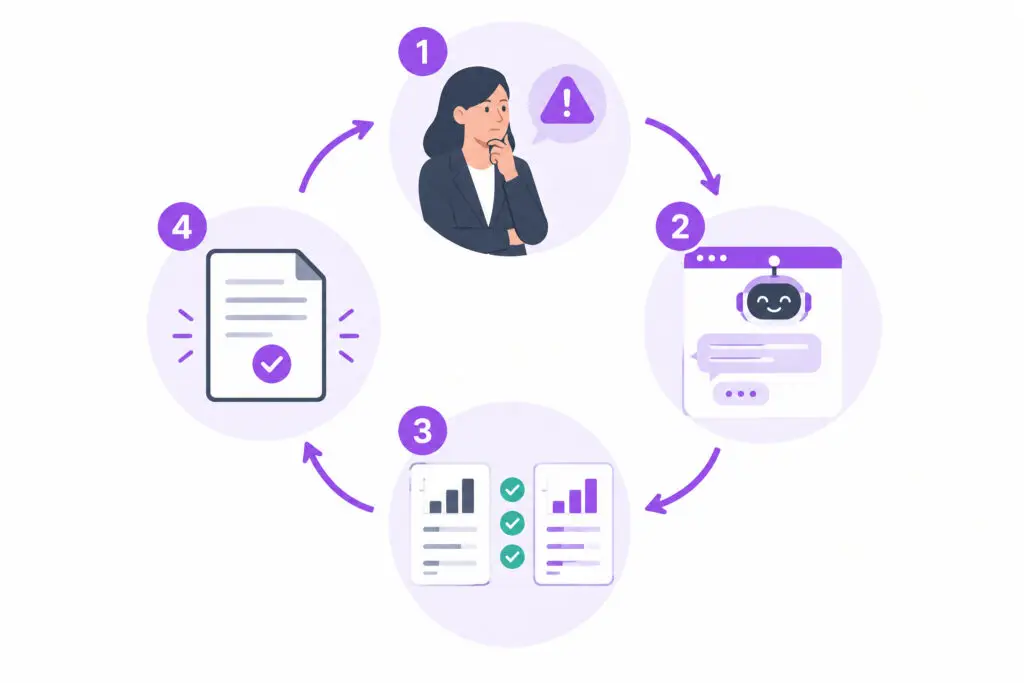
From problem to solution: A real-world example
The Scenario: “I need to draft a policy initiative aimed at reducing educational inequality through early childhood education, but our budget is highly constrained. How have others done this?”
- Step 1 — Smart Search (The Entry): Go to Search or the AI Assistant instead of browsing blindly, or filter the repository or the interactive map by Topic (Toolbox Reads) and Challenge (Resource/Budget constraints).
- Step 2 — Consult the AI Assistant (The Deep Dive): Ask the AI Assistant to extract the exact insights you need: “Show me the documented evaluation outcomes for budget-friendly ECEC initiatives in England and Poland.”
- Step 3 — Identify the pitfalls (risk management): Look at the Implementation Analysis provided by the AI. Identify potential stakeholder pushback (e.g., from teacher unions or school boards) based on historical peer data.
- Step 4 — Finalize your brief (your output): Download the relevant documents. Copy the evidence-based arguments, cost-benefit reflections, and recommendations provided by the AI Assistant directly into your own political decision document.